
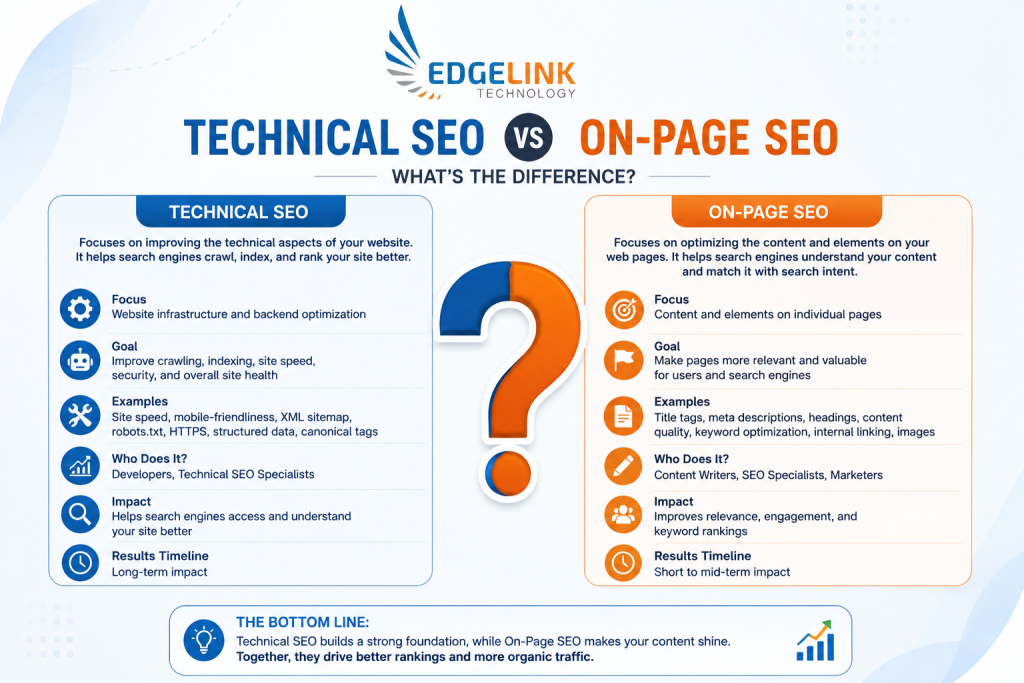
Search engine optimization has evolved significantly over the years, and businesses today need a strong SEO strategy to rank on Google. Two of the most important pillars of SEO are Technical SEO and On-Page SEO. Many website owners often get confused between these two concepts and ask: technical seo vs on page seo — which is more important?
The reality is that both play a crucial role in improving website visibility, user experience, and search engine rankings. Without proper technical SEO, search engines may struggle to crawl and index your website. Without strong on-page SEO, your content may fail to rank even if your site is technically perfect.
In this detailed guide, you will learn everything about on-page seo vs technical seo, including definitions, differences, importance, strategies, tools, and best practices.
What Is SEO?
SEO (Search Engine Optimization) is the process of optimizing a website to improve its visibility on search engines like Google. The main goal of SEO is to increase organic traffic and attract potential customers.
SEO is generally divided into three major categories:
| SEO Type | Purpose |
| On-Page SEO | Optimizing content and webpage elements |
| Technical SEO | Improving website structure and performance |
| Off-Page SEO | Building authority through backlinks |
Among these, understanding technical seo vs on page seo is essential because both directly affect your website’s ranking performance.
What Is On-Page SEO?
On-page SEO refers to the optimization of elements present directly on a webpage. It focuses on improving content quality, keyword placement, headings, images, internal links, and user experience.
The main objective of on-page SEO is to help search engines understand your content while making it useful for users.
Key Elements of On-Page SEO
1. Keyword Optimization
Keywords help search engines understand the topic of your page. Proper keyword placement improves visibility.
Important areas for keyword placement:
- Title tag
- Meta description
- URL
- Headings
- First paragraph
- Image alt text
- Internal links
Example:
If your keyword is technical seo vs on page seo, it should appear naturally throughout the content.
2. High-Quality Content
Content remains one of the strongest ranking factors. Google prefers content that is:
- Informative
- Original
- Easy to read
- Well-structured
- User-focused
Good content improves engagement and reduces bounce rates.
3. Title Tags
Title tags are clickable headlines shown in search engine results.
Best practices:
- Keep under 60 characters
- Include target keyword
- Make it engaging
Example:
Technical SEO vs On-Page SEO: Key Differences Explained
4. Meta Descriptions
Meta descriptions summarize webpage content.
Best practices:
- Keep between 150–160 characters
- Include primary keyword
- Encourage clicks
Example:
Learn the difference between technical SEO vs on-page SEO and discover which strategy improves rankings, traffic, and website performance.
5. Header Tags
Header tags improve readability and help organize content.
Structure example:
- H1: Main title
- H2: Main sections
- H3: Subsections
Proper headings improve both SEO and user experience.
6. Internal Linking
Internal links connect pages within your website.
Benefits:
- Improves navigation
- Helps distribute link authority
- Enhances crawlability
7. Image Optimization
Images should be optimized for both SEO and speed.
Optimization tips:
- Use descriptive file names
- Add alt text
- Compress images
- Use modern formats like WebP
8. URL Structure
SEO-friendly URLs should be short and descriptive.
Good Example:
example.com/technical-seo-vs-on-page-seo
Bad Example:
example.com/page?id=12345
What Is Technical SEO?
Technical SEO focuses on improving the technical aspects of a website so search engines can crawl, index, and rank pages efficiently.
Unlike on-page SEO, technical SEO deals with backend optimization and website infrastructure.
Key Elements of Technical SEO
1. Website Speed Optimization
Page speed is a confirmed ranking factor.
Slow websites can:
- Increase bounce rate
- Reduce conversions
- Harm rankings
Ways to improve speed:
- Enable caching
- Compress images
- Use CDN
- Minify CSS and JavaScript
2. Mobile Friendliness
Google uses mobile-first indexing, meaning it primarily evaluates the mobile version of your site.
A mobile-friendly website should:
- Load properly on all devices
- Have responsive design
- Provide easy navigation
3. Crawlability
Search engines use bots to crawl websites.
Technical SEO ensures:
- Important pages are accessible
- Crawl errors are minimized
- Robots.txt is properly configured
4. Indexability
Indexing allows pages to appear in search results.
Common indexing issues:
- Noindex tags
- Duplicate pages
- Canonical errors
5. XML Sitemap
An XML sitemap helps search engines discover important pages.
Benefits:
- Faster indexing
- Better crawl efficiency
- Improved visibility
6. HTTPS Security
Google prioritizes secure websites.
HTTPS:
- Protects user data
- Improves trust
- Positively impacts rankings
7. Structured Data
Structured data helps search engines understand webpage content.
Examples:
- FAQ schema
- Product schema
- Review schema
- Local business schema
Rich snippets can improve click-through rates.
8. Core Web Vitals
Core Web Vitals measure user experience.
Main metrics:
- Largest Contentful Paint (LCP)
- Interaction to Next Paint (INP)
- Cumulative Layout Shift (CLS)
Good Core Web Vitals improve rankings and usability.
Technical SEO vs On-Page SEO: Major Differences
Understanding the differences between on-page seo vs technical seo helps create a balanced SEO strategy.
| Feature | On-Page SEO | Technical SEO |
| Focus | Content optimization | Website infrastructure |
| Goal | Improve relevance | Improve crawlability |
| User Visibility | Visible to users | Mostly backend |
| Main Elements | Keywords, content, headings | Speed, sitemap, indexing |
| Impact | Improves content ranking | Improves website performance |
| Skill Type | Content-focused | Developer-focused |
| Examples | Meta tags, internal links | HTTPS, schema, mobile optimization |
Which Is More Important: Technical SEO or On-Page SEO?
The debate around technical seo vs on page seo often leads to one important conclusion: both are equally essential.
Why On-Page SEO Matters
Without proper content optimization:
- Search engines cannot understand your content
- Users may leave quickly
- Rankings remain low
On-page SEO ensures your content satisfies search intent.
Why Technical SEO Matters
Even the best content may not rank if:
- Pages are not indexed
- Website loads slowly
- Mobile experience is poor
Technical SEO creates the foundation for ranking success.
How On-Page SEO and Technical SEO Work Together
SEO success comes from combining both strategies.
Example:
| Scenario | Result |
| Great content but poor technical SEO | Indexing and speed issues reduce rankings |
| Strong technical SEO but weak content | Pages fail to satisfy search intent |
| Both optimized properly | Higher rankings and better traffic |
A successful website requires both technical strength and quality content.
Benefits of On-Page SEO
- Improved Search Rankings: Proper keyword optimization helps pages rank for relevant searches.
- Better User Experience: Well-structured content improves readability.
- Higher Click-Through Rates: Optimized title tags and meta descriptions increase clicks.
- Increased Engagement: Helpful content encourages users to spend more time on the website.
Benefits of Technical SEO
- Faster Website Performance: Optimized websites load quickly and improve user satisfaction.
- Better Crawling and Indexing: Search engines can access pages more efficiently.
- Improved Mobile Experience: Responsive websites perform better on smartphones.
- Enhanced Security: HTTPS improves user trust and protects data.
Common On-Page SEO Mistakes
| Mistake | Impact |
| Keyword stuffing | Google penalties |
| Thin content | Low rankings |
| Missing meta tags | Reduced CTR |
| Poor internal linking | Weak navigation |
| Duplicate content | Indexing issues |
Common Technical SEO Mistakes
| Mistake | Impact |
| Slow website speed | High bounce rates |
| Broken links | Poor user experience |
| Missing sitemap | Crawl issues |
| Improper redirects | Traffic loss |
| Mobile usability issues | Lower rankings |
Best Tools for On-Page SEO
1. Yoast SEO
Useful for WordPress optimization.
Features:
- Keyword analysis
- Readability checks
- Meta tag optimization
2. Rank Math
Popular SEO plugin with advanced features.
Features:
- Schema support
- Keyword optimization
- SEO scoring
3. Surfer SEO
Helps optimize content based on competitor analysis.
4. Grammarly
Improves readability and grammar quality.
Best Tools for Technical SEO
1. Google Search Console
Helps monitor:
- Indexing
- Coverage errors
- Performance data
2. Screaming Frog
Useful for technical website audits.
Features:
- Crawl analysis
- Broken link detection
- Meta tag audits
3. GTmetrix
Analyzes website speed and performance.
4. PageSpeed Insights
Measures Core Web Vitals and speed performance.
Technical SEO Checklist
Here is a quick technical SEO checklist:
| Task | Status |
| HTTPS enabled | ✔ |
| XML sitemap submitted | ✔ |
| Mobile-friendly design | ✔ |
| Fast loading speed | ✔ |
| Proper redirects | ✔ |
| No crawl errors | ✔ |
| Structured data implemented | ✔ |
On-Page SEO Checklist
| Task | Status |
| Keyword optimized title | ✔ |
| Meta description added | ✔ |
| Header tags optimized | ✔ |
| Internal links added | ✔ |
| Images optimized | ✔ |
| SEO-friendly URLs | ✔ |
| Quality content created | ✔ |
Future of Technical SEO and On-Page SEO
SEO continues to evolve with AI and user-focused ranking systems.
Future trends include:
- AI-generated search summaries
- Voice search optimization
- Better user experience signals
- Semantic search improvements
- Enhanced mobile performance
Businesses that invest in both technical SEO and on-page SEO will stay competitive.
Conclusion on Technical SEO vs On-Page SEO
When comparing technical seo vs on page seo, it is important to understand that they are not competitors. Instead, they work together to improve your website’s visibility, performance, and rankings.
On-page SEO helps optimize content and improve relevance for users and search engines. Technical SEO ensures search engines can efficiently crawl, index, and rank your website.
If your website has excellent content but poor technical structure, rankings may suffer. Similarly, a technically perfect website with weak content will struggle to attract users.
The best SEO strategy combines:
- Strong technical foundation
- High-quality optimized content
- Excellent user experience
- Mobile-friendly design
- Fast page speed
By implementing both on-page SEO and technical SEO correctly, you can improve rankings, increase traffic, and grow your online presence successfully.
FAQs About Technical SEO vs On-Page SEO
Q. Is technical SEO harder than on-page SEO?
Technical SEO is generally more complex because it involves backend website optimization and sometimes requires developer knowledge.
Q. Can a website rank without technical SEO?
A website may rank temporarily, but technical issues can limit long-term growth and visibility.
Q. Does on-page SEO still matter in 2026?
Yes, on-page SEO remains essential because content relevance and user experience are major ranking factors.
Q. Which should I do first: technical SEO or on-page SEO?
Start with technical SEO to ensure your website can be crawled and indexed properly. Then focus on on-page optimization.
Q. How often should technical SEO audits be performed?
Technical SEO audits should ideally be performed every 3–6 months or after major website updates.

Akshata Jadhav
Akshata Jadhav is a Senior SEO at EdgeLink Technology with a strong foundation in search engine optimization and a passion for driving organic growth. She is driven by data, fueled by a love for digital trends, and committed to crafting search strategies that deliver measurable results. Outside of work, she’s happiest when spending time outdoors, reading, writing her own blogs, or discovering new ideas on social media.